Free template
Free Budget Template for Google Sheets
Quick answer
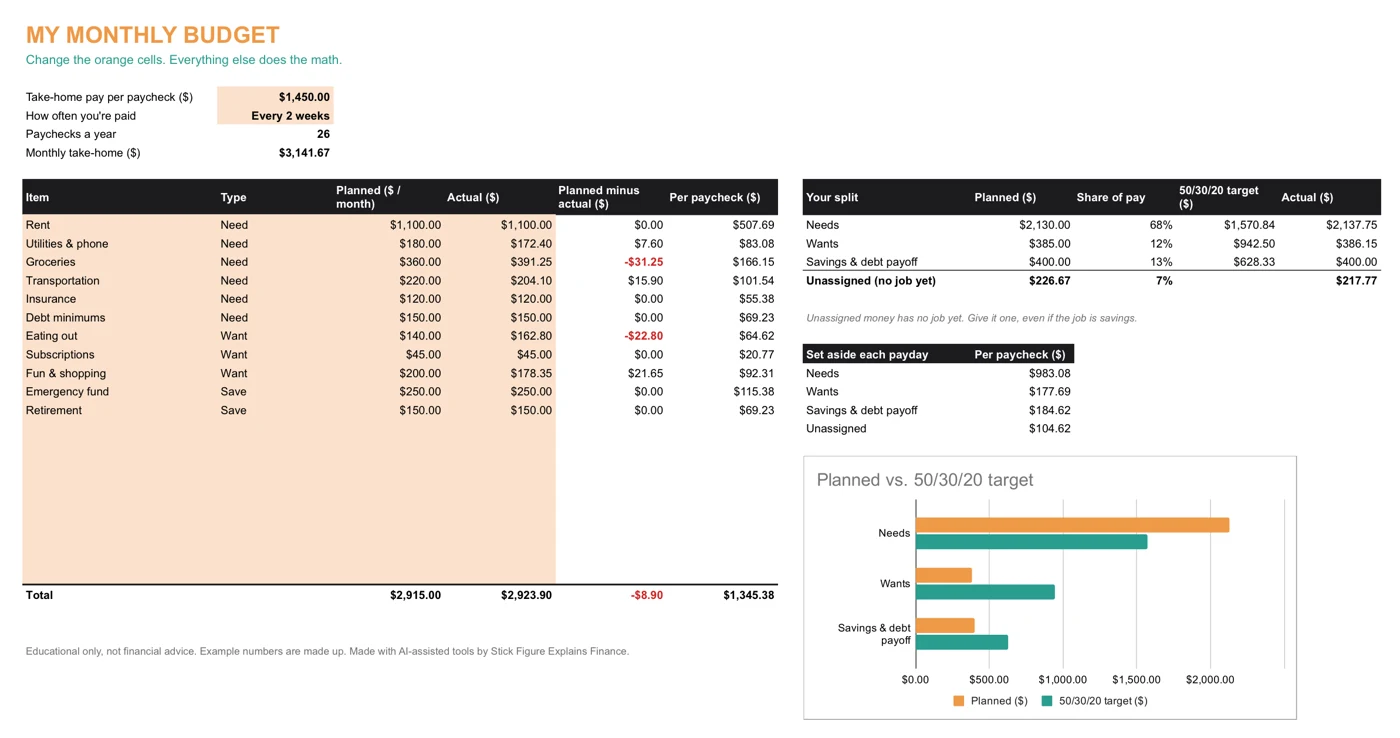
Nia's Simple Budget is a free Google Sheets budget template. Type your take-home pay and pick how often you're paid, list your monthly costs as needs, wants or savings, and it shows your 50/30/20 split, what to set aside from each paycheck, and planned vs. actual spending. No email or sign-up: one click makes your own copy.
Translated "Every dollar gets a job before the month starts."


What's inside
- Pay in any schedule: weekly, every 2 weeks, twice a month or monthly. It works out your monthly take-home (every 2 weeks = 26 paychecks a year).
- 20 budget lines, each marked Need, Want or Save with a dropdown, plus a planned and an actual column.
- Your 50/30/20 split: what you planned for needs, wants and savings, as a share of your pay, next to the guideline target.
- Set aside each payday: the amount for each category from every paycheck.
- Over-plan warnings: anything you overspend turns red.
- Unassigned money: what's left with no job yet, so you can give it one.
- A Start Here tab with the steps, and a chart of planned vs. target.
How to use it: watch Nia set it up (about a minute)
Nia sets up Nia's Simple Budget on screen in a real copy of the sheet, step by step. Watch the walkthrough
Read the walkthrough instead
Nia: Hi, it's Nia. This is my Simple Budget. It's free, and it takes about 10 minutes.
Nia: First, make it yours. Open the link, or go to File, then Make a copy.
Nia: On the Budget tab, type your take-home pay from one paycheck, and pick how often you're paid. It works out your monthly take-home.
Nia: Then list your monthly costs. Mark each one need, want, or save, and type what you plan to spend.
Nia: Watch. I'll add my gym: $30 a month, a want. My wants go up, and the money with no job yet goes down.
Nia: During the month, fill in the Actual column. Anything you overspend turns red.
Nia: On the right, you'll see your split: needs, wants, and savings, as a share of your pay. And what to set aside from each paycheck.
Nia: Unassigned money has no job yet. Give it one, even if the job is savings.
Nia: That's it. Plan it once, then check it every payday. Want every bill matched to the paycheck that pays it? That's my Payday Setup.
Made with AI-assisted animation and voice. Example numbers are made up. Educational only, not financial advice.
How to get your copy
- Click Make my free copy and sign in to your Google account if asked.
- Click Make a copy. It saves to your own Google Drive.
- Open the Budget tab, type your take-home pay from one paycheck and pick how often you're paid.
- Replace Nia's example items with yours, using monthly amounts (a $600 yearly bill is $50 a month).
- During the month, fill in the Actual column to see where you're over or under.
Want to try numbers first? The free budget calculator does the same split in your browser, no copy needed.
Which tool do I need?
| Tool | Price | Best for |
|---|---|---|
| Nia's Simple Budget | Free | A monthly plan with 50/30/20 and planned vs. actual |
| Nia's Payday Setup | $12 | Matches every bill to the paycheck that pays it, savings buckets, what's left from each paycheck |
| Sid's Receipts | $5 | Logging every spend and finding your biggest money leak |
| Nia's Debt Snowball | $12 | A month-by-month plan to pay off every debt |
| Nia's Money Kit | $22 | All three paid sheets together ($29 separately) |
Questions people ask
Is the budget template really free?
Yes. No email, no sign-up, no trial. Click the button, sign in to your Google account, and Google makes you your own copy to keep.
How do I copy a Google Sheets budget template?
Open the copy link while signed in to Google and click Make a copy. The copy lands in your Google Drive and only you can see it. If you opened the preview instead, use File > Make a copy.
Does it work in Excel or on my phone?
It's built for Google Sheets, which is free in any browser and in the Google Sheets app on iPhone and Android. You can download it as an Excel file (File > Download), but the dropdowns and formatting work best in Sheets.
What if I'm paid every two weeks or every week?
Pick your pay schedule from the dropdown. The sheet turns it into a monthly figure (every 2 weeks = 26 paychecks a year) and shows what to set aside from each paycheck.
Can I add my own categories?
Yes. Rename any item, change the amounts and mark each one Need, Want or Save. There are 20 rows; leave the ones you don't need blank.
Is my data private?
Your copy lives in your own Google Drive. We can't see it, and nothing is sent to us.
Educational only, not financial advice. Nia is a fictional character and the example numbers are made up. The 50/30/20 split is a common guideline, not a rule.