Template
Nia's Debt Snowball: a debt snowball spreadsheet for Google Sheets
Quick answer
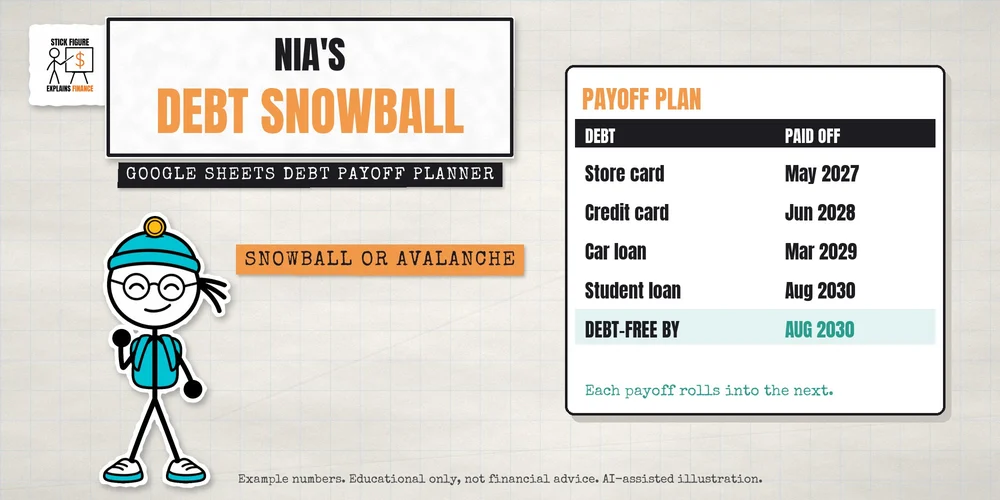
Nia's Debt Snowball is a Google Sheets debt payoff planner. List up to 10 debts once, add any extra you can pay each month and pick Snowball or Avalanche. It shows the month you'll be debt-free, the order to pay things off, when each debt hits zero and how much interest you'll pay. $12, yours to keep.
Watch Nia walk Sid through it (under a minute)
Transcript
Matt: It's Matt. Sid has a question.
Sid: I pay my cards every single month. Why does the number never move?
Nia: Because the minimums mostly feed the interest. You need a plan. So I made one.
Nia: The Debt Snowball. It's a Google Sheet. List your debts once: the balance, the interest rate, the minimum payment.
Nia: Add any extra you can pay each month. Even twenty-five dollars helps.
Nia: Pick Snowball, smallest balance first, for quick wins. Or Avalanche, highest interest first, to pay the least.
Nia: Then it shows you the exact month you're debt-free.
Nia: In my example, that extra hundred and fifty a month gets you out fifteen months sooner, and saves about twenty-five hundred dollars in interest.
Sid: Okay. I'm doing the snowball.
Matt: The Debt Snowball, from Nia. It's right here. That's the math. I'm Matt. This is Stick Figure Explains Finance.
Made with AI-assisted animation and voice. Educational only, not financial advice.
What's inside
- My Debts: up to 10 debts with balance, APR and minimum payment
- One dropdown: Snowball or Avalanche
- Payoff Plan: debt-free date, months to go, total interest and total paid
- The month each debt hits zero, and the order to pay them
- A chart of your total debt falling
- Start Here guide with a filled-in example
$12
Get the Debt SnowballWant all three sheets? Nia's Money Kit bundles the Payday Setup, the Debt Snowball and Sid's Receipts for $22 instead of $29.
7-day promise: if the sheet doesn't work for you, reply to your receipt email within 7 days and we'll fix it or refund you.
Delivered as a make-a-copy link to your own Google Drive. Educational tool only; not financial advice.
How to use it: watch Nia set it up (about a minute and a half)
Nia sets up Nia's Debt Snowball on screen in a real copy of the sheet, step by step. Watch the walkthrough
Read the walkthrough instead
Nia: Hi, it's Nia. Let's set up your Debt Snowball. You'll have a debt-free date in about five minutes.
Nia: First, make it yours. Open the link in your email, or go to File, then Make a copy.
Nia: On the My Debts tab, list each debt: the balance, the interest rate, and the minimum payment.
Nia: Watch. I'll add a medical bill: $600, 0%, $50 a month. It's my smallest balance, so it jumps to #1 in the payoff order.
Nia: Next, type the extra you can pay each month, on top of all your minimums. Even $25 helps.
Nia: Then pick your order. Snowball pays the smallest balance first, for quick wins. Avalanche pays the highest rate first, to pay the least interest.
Nia: Now open Payoff Plan. Here's your debt-free month, how many months it takes, and the interest you'll pay.
Nia: Watch what happens when I raise my extra from $150 to $250. Debt-free 6 months sooner, and about $600 less interest.
Nia: Below, you'll see when each debt hits zero, and a chart of your total debt falling.
Nia: That's it. Pay the same total every month, and roll each paid-off payment into the next one. Questions? Just reply to your receipt email.
Made with AI-assisted animation and voice. Example numbers are made up. Educational only, not financial advice.
Who it's for, and who can skip it
- For you if you have two or more debts, you pay every month and the balances barely move, or you want a date to aim for.
- Skip it if you have a single debt: the free credit card payoff calculator or debt payoff calculator answers it for free.
Pairs well with
Sid's Receipts ($5) finds the leaks you can turn into an extra debt payment, and Nia's Payday Setup ($12) sets that payment aside from every paycheck.
Questions people ask
What is a debt snowball spreadsheet?
A spreadsheet that plans your debt payoff month by month: you list your debts once, choose an order, and it works out each month's payments, when each debt hits zero and your debt-free date.
Snowball or avalanche: which does the sheet use?
Both. One dropdown switches between Snowball (smallest balance first) and Avalanche (highest interest first), and every date and total updates.
How many debts can I add?
Up to 10: cards, store cards, car loans, student loans, medical bills. Leave unused rows blank.
Do I need Excel?
No. It's a Google Sheet. You need a free Google account to make your own copy, and it works in the Google Sheets app on your phone.
Is it the same math as your free calculator?
Yes. The free debt payoff calculator uses the same month-by-month rules. The sheet is yours to keep, edit and update every month as you pay things off.