Template
Nia's Payday Setup: a paycheck budget template for Google Sheets
Quick answer
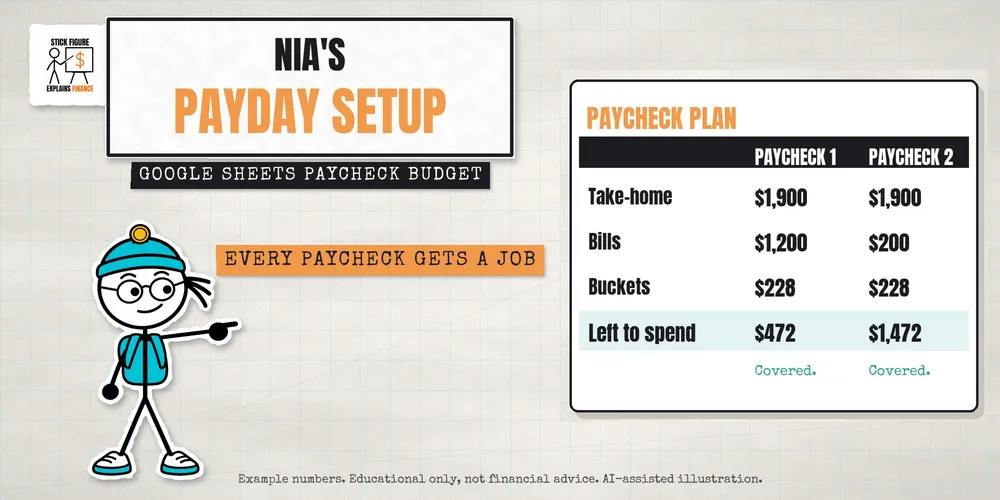
A paycheck budget plans your money one paycheck at a time. Nia's Payday Setup is a Google Sheet: type in each paycheck, your bills with due dates, and your savings buckets. It works out which paycheck pays which bill, how much goes into each bucket, and what's left to spend from each check.
What's inside
- Setup: paychecks, bills and buckets
- Paycheck Plan: what each paycheck covers and what's left
- Bucket Tracker: log deposits and watch each goal fill
- Bills assigned to a paycheck automatically by due date
- Start Here guide with a color key
$12
Get the templateWant all three sheets? Nia's Money Kit bundles the Payday Setup, the Debt Snowball and Sid's Receipts for $22 instead of $29.
7-day promise: if the sheet doesn't work for you, reply to your receipt email within 7 days and we'll fix it or refund you.
Delivered as a make-a-copy link to your own Google Drive. Educational tool only; not financial advice.
How to use it: watch Nia set it up (about a minute)
Nia sets up Nia's Payday Setup on screen in a real copy of the sheet, step by step. Watch the walkthrough
Read the walkthrough instead
Nia: Hi, it's Nia. Let's set up your Payday Setup. It takes about five minutes.
Nia: First, make it yours. Open the link in your email, or go to File, then Make a copy.
Nia: On the Setup tab, type your take-home pay for each paycheck, and the day your second paycheck usually lands.
Nia: Then list your bills: the name, the amount, and the day it's due.
Nia: Watch. I'll add my gym: $30, due on the 8th. The sheet puts it on paycheck 1, because it's due before paycheck 2 lands.
Nia: Want a bill on the other paycheck? Pick 1 or 2 in the Move column. I moved my phone bill to paycheck 1.
Nia: Next, name your buckets, like an emergency jar, and choose a percent of each paycheck for each one.
Nia: Now open Paycheck Plan. Each paycheck shows its bills, what goes into your buckets, and what's left to spend. Paycheck 1 has $377 left.
Nia: Every time you save, log it in Bucket Tracker, and watch the bucket fill.
Nia: That's it. Every paycheck has a job before you spend it. Questions? Just reply to your receipt email.
Made with AI-assisted animation and voice. Example numbers are made up. Educational only, not financial advice.
Nia's rule vs. Sid's rule
Nia: every paycheck gets a job before you spend it. Sid: spend it, then see what's left. Sid is still looking for what's left.
Questions people ask
What is a paycheck budget?
A budget planned one paycheck at a time instead of one month at a time. Each bill is assigned to the paycheck that arrives before it's due, and each paycheck gets a job before you spend it.
How do you budget a biweekly paycheck?
List your bills with due dates, assign each one to the paycheck that lands before it's due, set aside savings from each check, and see what's left to spend. Nia's Payday Setup does the assigning and the math for you.
Does it work if I'm paid once a month?
Yes. Set the second paycheck to $0 and everything goes on paycheck one.
Do I need Excel?
No. It's a Google Sheet. You need a free Google account to make your own copy.